
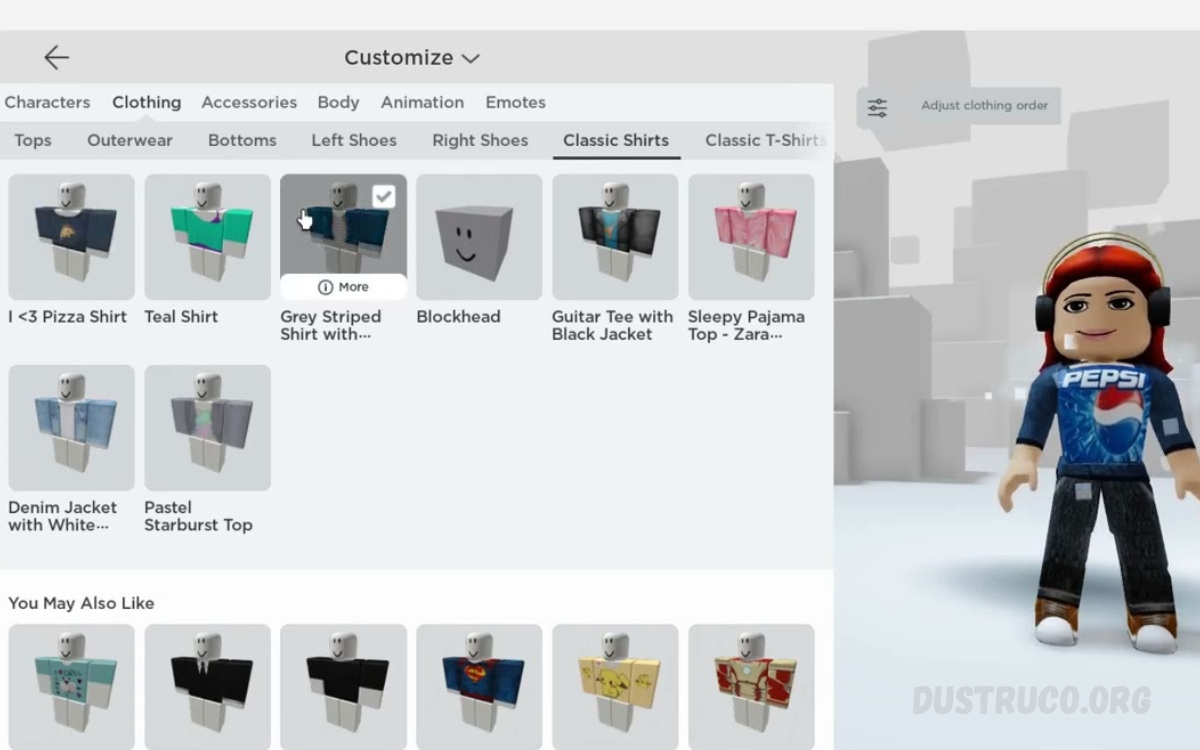
Your Roblox avatar is more than just a digital character; it’s your identity in one of the world’s most popular gaming universes, Roblox. Customizing your avatar allows you to express your personality, creativity, and style while exploring millions of immersive games and experiences.
From changing hairstyles, facial expressions, and outfits to equipping rare accessories and animated gear, every detail helps you stand out in the crowd. Players can mix and match clothing items from the Roblox catalog or even create their own designs to showcase originality.
What is Roblox Avatar Customization?
Avatar customization in Roblox is the process of changing the appearance and style of your in-game character. Every user starts with a default avatar, but this can be fully modified.
Players can change:
- Body shape
- Clothing style
- Hair and face
- Accessories and hats
- Animations and movements
- Skin tone and colors
The customization system is designed to be flexible, allowing users to create anything from realistic characters to fantasy or meme-style avatars.
Importance of Customizing Your Roblox Avatar
Customizing your avatar is not just for fun. It has several benefits:
1. Personal Identity
Your avatar represents who you are in the digital world. A unique design helps you stand out.
2. Social Recognition
Players with attractive or rare outfits get noticed more in games and communities.
3. Creativity Expression
Roblox allows unlimited creativity. Users can mix styles, colors, and themes freely.
4. Gaming Experience
A customized avatar improves immersion and makes gameplay more enjoyable.
5. Community Engagement
Better-looking avatars often receive more friend requests, interactions, and attention.
How to Customize Your Roblox Avatar
To Customize Your Roblox Avatar, follow these basic steps:
Step 1: Open Avatar Editor
Go to the Roblox homepage and click on the “Avatar” section.
Step 2: Choose Body Style
Select between classic, blocky, or realistic body types.
Step 3: Select Clothing
Pick shirts, pants, jackets, and full outfits from the catalog.
Step 4: Add Accessories
Hats, glasses, backpacks, and other items enhance your look.
Step 5: Apply Animations
Change walking, running, and idle animations for a unique movement style.
Step 6: Save Avatar
After customizing, save your avatar to apply the changes across all games.
Clothing Options in Roblox
Clothing is one of the most powerful tools for customization.
Shirts and T-Shirts
Players can use:
- Free shirts
- Premium designer outfits
- Custom uploaded designs
Pants and Bottom Wear
Options include:
- Jeans
- Joggers
- Shorts
- Fantasy costumes
Layered Clothing
Modern Roblox supports 3D layered clothing that fits naturally on avatars, making designs more realistic.
Accessories and Items
Accessories play a major role in Customizing Your Roblox Avatar.
Popular Accessories:
- Hats and caps
- Hair styles
- Face masks
- Glasses
- Wings and back items
Rare accessories often come from limited events or special promotions, making them valuable among players.
Read Also: Complete Guide to Roblox Game Strategies and Tips
Face and Body Customization
Face and body design define character personality.
Face Styles
- Happy expressions
- Cool or edgy looks
- Funny meme faces
- Custom animated expressions
Body Types
- Classic blocky avatar
- Slim realistic avatar
- Muscular or stylized avatar
Choosing the right combination creates a strong visual identity.
Trending Avatar Styles in Roblox
Customization trends change over time. Popular styles include:
1. Aesthetic Avatars
Soft colors, minimal outfits, clean look.
2. Pro Gamer Style
Dark outfits, masks, headphones, tactical appearance.
3. Meme Avatars
Funny faces and exaggerated outfits.
4. Luxury Style
Rare items, expensive clothing, VIP accessories.
5. Fantasy Characters
Wings, magic items, swords, and themed costumes.
Tips to Customize Your Roblox Avatar Professionally
To improve your avatar design, follow these tips:
Keep Theme Consistent
Do not mix too many styles. Choose one theme.
Use Color Balance
Match colors properly for better visual appeal.
Avoid Overloading Accessories
Too many items can make avatar look messy.
Follow Trends
Check popular avatars for inspiration.
Use Limited Items
Rare items increase uniqueness and value.
Common Mistakes to Avoid
Many players make mistakes while customizing avatars:
- Using too many bright colors
- Mixing unrelated styles
- Ignoring body proportions
- Overusing accessories
- Copying others without creativity
Avoiding these mistakes improves your avatar quality.
How to Get Free Items for Avatar Customization
Roblox offers several ways to get free items:
- Event rewards
- Promotional codes
- Free catalog items
- Game achievements
- Seasonal events
These help players customize without spending money.
Advanced Customization Techniques
Experienced players use advanced techniques like:
Layered Clothing Mixing
Combining jackets, shirts, and accessories for depth.
Animation Customization
Creating unique movement styles.
Avatar Scaling
Adjusting height, width, and proportions.
Theme Building
Creating complete character stories like a ninja, a soldier, or an influencer.
Roblox Avatar Economy
Some items in Roblox have real-world value due to rarity. Limited edition accessories and collectibles are traded among players. This makes avatar customization not just creative but also part of the digital economy.
Future of Avatar Customization in Roblox
The future of Customize Your Roblox Avatar is becoming more advanced with:
- AI-generated outfits
- Realistic 3D avatars
- Motion-based customization
- Voice and facial tracking integration
- More immersive virtual identity systems
Roblox continues to improve customization tools to make avatars more realistic and expressive.
Frequently Asked Questions
Can I create my own clothing for my avatar?
Yes, Roblox allows users with a premium membership to design and upload custom shirts, pants, and t-shirts.
What are the most popular avatar styles in Roblox?
Popular styles include aesthetic avatars, gamer style, meme avatars, luxury outfits, and fantasy characters.
How can I get rare items for my avatar?
Rare items can be obtained through events, limited-time promotions, trading, or purchasing from the catalog when available.
Can I change my avatar anytime?
Yes, you can customize your avatar anytime, without restrictions, through the Avatar Editor.
What is layered clothing in Roblox?
Layered clothing is a 3D clothing system that fits naturally on avatars, making outfits look more realistic and modern.
Why is avatar customization important in Roblox?
It helps express personality, improves social interaction, and makes your character stand out in games and communities.
Can I use accessories from different themes together?
Yes, but it is best to maintain a consistent style to avoid a messy or unbalanced appearance for your avatar.
Conclusion
Customize Your Roblox Avatar is a powerful feature that defines your identity in Roblox. It allows full creative freedom through clothing, accessories, body styles, and animations. A well-designed avatar improves social interaction, gaming experience, and personal expression.
Whether you are a beginner or an advanced player, mastering avatar customization helps you stand out in the Roblox community.
